Google Fonts and the GDPR — the alternative that's faster.
Since the Munich ruling, CDN-embedding Google Fonts is a legal risk in Germany. The fix takes an hour, improves load time — and we just implemented it ourselves. The guide.
If you embed Google Fonts via Google’s servers (fonts.googleapis.com), every page view transmits the visitor’s IP address to Google — without their consent. The Regional Court of Munich I ruled exactly that a GDPR violation on 20 January 2022 (case 3 O 17493/20) and awarded damages. The solution is self-hosting: serving the fonts from your own server. It takes about an hour, removes the legal exposure entirely — and makes the website faster as a side effect.
We just completed this migration on our own website. This post is the ruling in plain language, the how-to — and the measurements that matter afterwards.
The ruling, in three sentences
The court held: dynamically embedding Google Fonts transmits the visitor’s IP address to Google; an IP address is personal data (as the European Court of Justice established in Breyer, C-582/14, back in 2016); and there is neither consent nor a legitimate interest for this transmission — because the fonts can just as well be hosted locally. Outcome: an injunction plus €100 in damages for the claimant.
The practical consequence arrived in 2022 as a wave of warning letters (Abmahnungen) to German website operators whose sites loaded Google Fonts externally — trivially discoverable at scale, since the embed sits in every page’s public source code. Whether individual letters were abusive doesn’t change the core: the legal position has been known since 2022, and external embedding has been an avoidable attack surface ever since.
The issue is not what Google does with the data. The issue is that the transmission happens without consent — and that it is technically simply unnecessary.
The self-test: are you affected? (30 seconds)
Open your website, view the page source (Ctrl+U), and search for fonts.googleapis.com or fonts.gstatic.com. A match means: your visitors’ IPs go to Google’s servers on every view. This includes embeds that a theme or page builder ships without asking — the most common case on legacy stacks, and one of the items our free audit checks by default.
The three options — and why only one is good
- Gate it behind a consent banner. Legally possible, practically absurd: the page loads its typeface only after a click, the text visibly reflows, and you’ve added one more banner that costs conversions. A crutch.
- Use system fonts. Fastest option, zero risk — but you give up typography as a brand element. Right for some projects, wrong for most brands.
- Self-host. The same fonts, served from your own server or CDN edge like any other file on the site. No third-country transfer, no banner, no design change. That’s the answer.
The guide: self-hosting in four steps
Step 1 — Obtain the fonts
Two clean routes: for npm-based projects, the Fontsource packages (versioned, licence-compliant, variable cuts available). For everything else, the google-webfonts-helper, which generates WOFF2 files plus ready-made @font-face CSS. Download only the cuts you actually use — every unused variant is dead weight.
Step 2 — Wire it in and remove the old references
In our case (Astro, three font families), the CDN <link> tags in the layout gave way to three import lines:
import '@fontsource-variable/geist';
import '@fontsource-variable/geist-mono';
import '@fontsource-variable/fraunces/full.css';
Then delete the <link rel="stylesheet" href="https://fonts.googleapis.com/…"> and preconnect lines without replacement. Mind the trap: variable Fontsource cuts change the family name — "Geist" becomes "Geist Variable". The font-family declarations in your CSS must follow, or the fallback font renders and nobody notices immediately.
Step 3 — Check the performance win
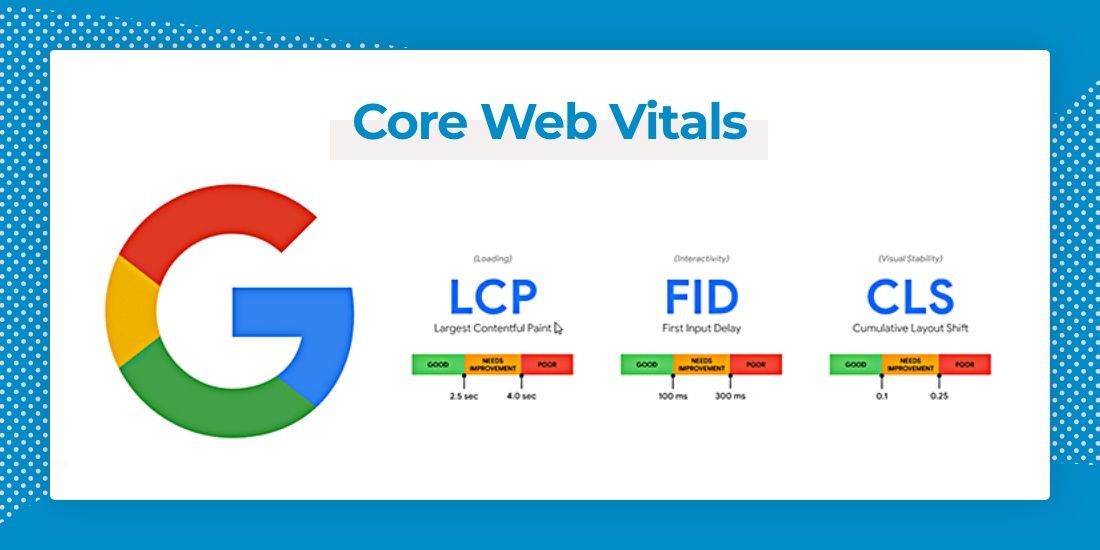
Self-hosting is also a speed gain: two external connections disappear (DNS lookup and TLS handshake to fonts.googleapis.com and fonts.gstatic.com), the fonts ship from the same edge as the HTML, and they’re served with long-lived cache headers. Two rules remain: font-display: swap (text appears immediately in a fallback instead of waiting invisibly — Fontsource sets this by default) and a frugal selection of cuts. Verify the result in two minutes with our performance audit — the metrics that matter are LCP and CLS; we tabulated all thresholds here.
Step 4 — Verify
After deploying: check the source again for fonts.googleapis (must be empty), load once with an empty cache and confirm in the network tab that every font request comes from your own domain. Then update the privacy policy: the Google Fonts transmission clause goes away — one less paragraph that costs trust.
What this has to do with SEO and GEO
More than it seems. First, directly: font loading affects LCP and CLS, and those are ranking signals. Second, indirectly: a website without consent-requiring third-party connections needs less consent machinery — less banner friction, better SXO. And third, fundamentally: GDPR cleanliness from the first deploy is part of every site build and migration we do — as the standard, not as a paid option.
If you want to know what else your website sends to third parties and where it leaves load time on the table: the free audit shows both, within 24 hours.